Lead statuses
Settings → Status (?tab=status)
This is where you shape your sales pipeline. Every lead in Calliyo sits at exactly one status, and the list of statuses you define here becomes the stages of your pipeline.
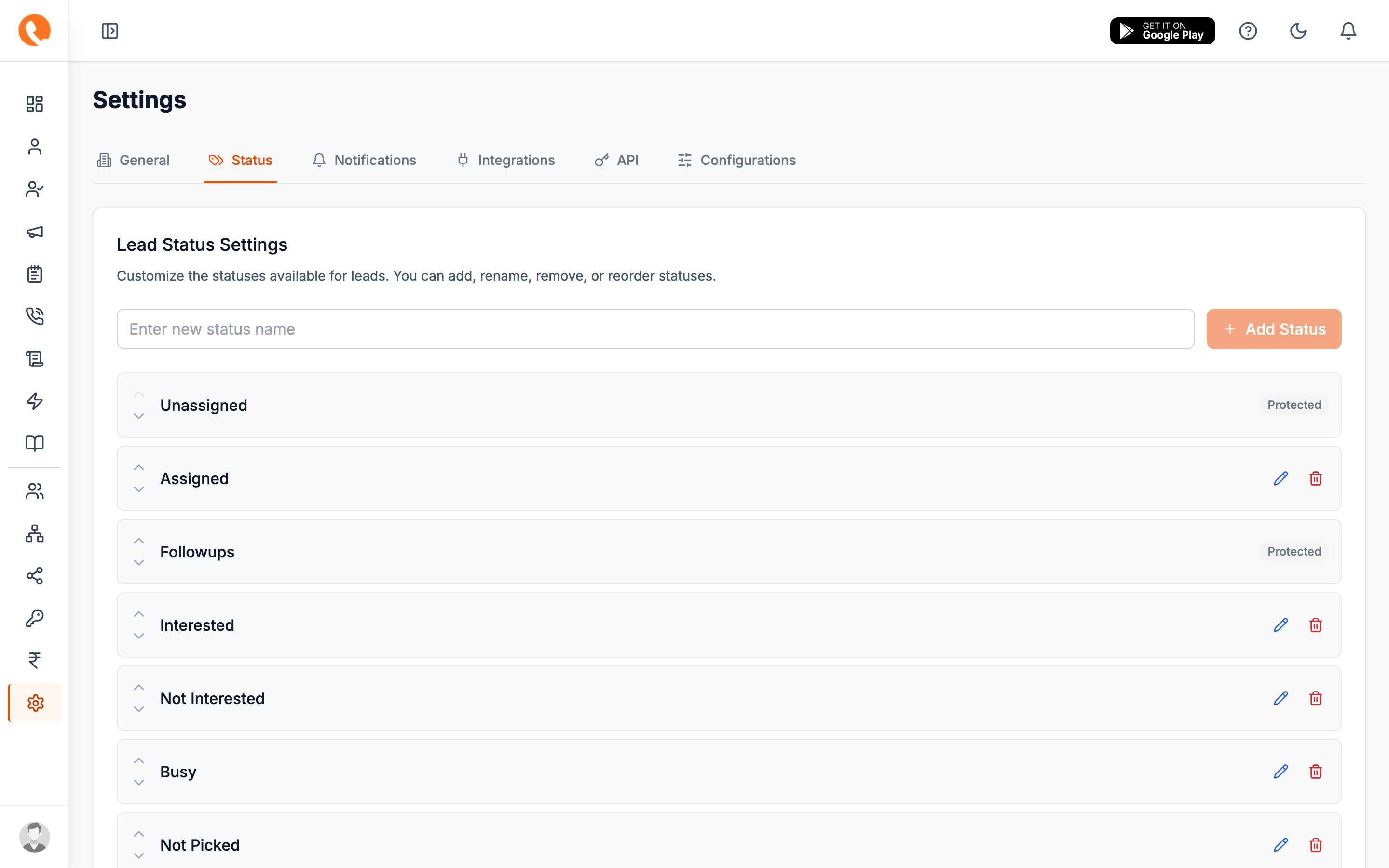
The default pipeline
A fresh company ships with this pipeline:
Unassigned → Assigned → Followups → Interested / Not Interested / Busy
           → Not Picked / Missed / Wrong Number → Customer
You can rename, delete, reorder, or add to any of these — except three that are protected by the system.
Protected statuses
The three statuses below are marked Protected in the UI and cannot be renamed or deleted:
| Status | Why it’s protected |
|---|---|
| Unassigned | Every new lead lands here before assignment. Renaming would break inbound webhooks and the lead-capture API. |
| Followups | The follow-up scheduler moves leads into this bucket automatically when a callback is scheduled. |
| Customer | The “won” status. Converting a lead means moving it here — billing, reports, and the Customers page all depend on this exact name. |
If “Customer” is renamed in a custom company config, the Customers page may appear empty. If yours is, contact support — this should not happen via the UI, only via direct DB edits.
Adding a status
- Type the new status name in the Add status input at the top.
- Click Add Status.
- The new status appears at the bottom of the list. Use the up-arrow to move it where it belongs in your pipeline.
Editing a status
- Click the pencil icon next to a status.
- Type the new name.
- Click the check icon to save, or X to cancel.
Existing leads sitting on this status will inherit the new name immediately — the rename is in-place.
Reordering
The up and down arrows next to each row move it one position. The order you choose here is the order statuses appear in:
- The status dropdown when editing a lead
- The Leads page filter chips
- Funnel charts on the Dashboard and Reports
The first row’s up-arrow and the last row’s down-arrow are disabled.
Deleting
Click the trash icon. You can’t delete:
- A protected status (Unassigned, Followups, Customer).
- The last remaining status (you must have at least one).
Leads currently on a deleted status are not deleted — they remain in the database but the UI will treat the status as unknown. Reassign any leads to a different status before deleting.
Where this is stored
Custom statuses are saved on the company record under
Company.settings.leadStatuses. The mobile app reads the same value via
GET /agents/leads/settings/statuses, so changes here apply everywhere
immediately.